
Preparing for the Canadian citizenship test takes more than studying Discover Canada. Your device, internet connection, identity photos and the testing environment are all worth checking before exam day.
Under Immigration, Refugees and Citizenship Canada's (IRCC) current online test rules, candidates have 45 minutes and generally up to three attempts during the 30-day period specified in their invitation.
A score of 15/20 or higher on the screen does not mean IRCC has already confirmed your official result. IRCC reviews test records and identity information after you submit. A technical problem, an inability to verify your identity or suspected non-compliance may lead to an invalidated result and a new testing arrangement.
This guide explains the official format, common technical pitfalls and what to do if things go wrong.
Key takeaways
- The test has 20 questions in 45 minutes; you need 15 correct answers (75%) to pass.
- You generally have up to three attempts within the same 30-day invitation window.
- The score displayed immediately after submitting is unofficial until IRCC reviews it.
- Your webcam, identification photos, browser, VPN settings and test location all affect whether the result can be validated.
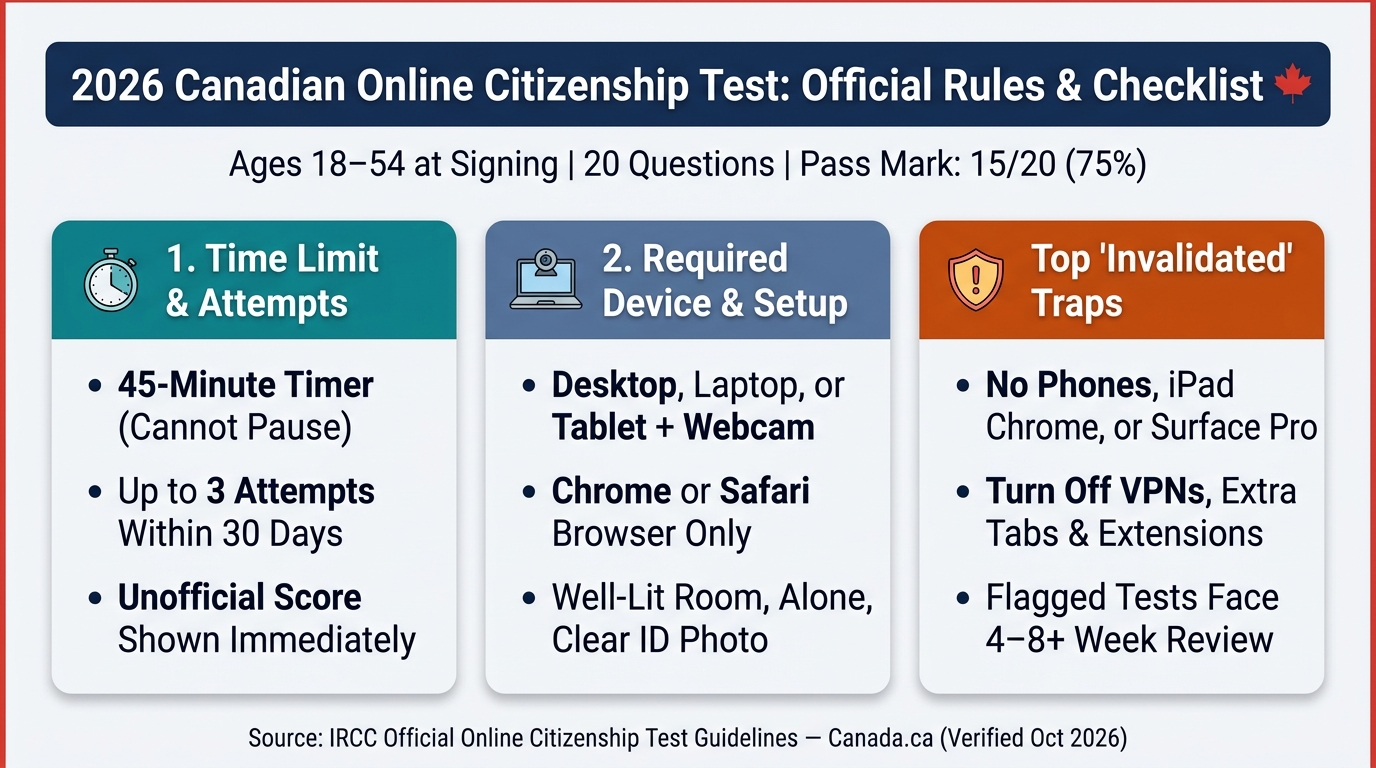
Northora summary graphic. See the linked IRCC instructions at the end of this guide for the official requirements.
1. The basic rules for the 2026 Canadian citizenship test
In most cases, applicants who are 18 to 54 years old on the day they sign their citizenship application must take the knowledge test.
- Number of questions: 20
- Languages: English or French
- Question types: Multiple choice and true/false
- Time limit: 45 minutes
- Pass mark: At least 15 correct answers (75%)
- Testing period: The 30 days specified in your invitation
- Attempts: Up to three
- Official study resource: Discover Canada
Questions cover Canadian history, geography, government, laws, rights and responsibilities. Discover Canada is the official study guide.
The 45-minute countdown cannot be paused
Once you select “Start the test,” the countdown begins. Closing the browser, losing your connection or signing in again does not stop the clock. You will receive a warning with five minutes remaining. At the end of 45 minutes, the system automatically submits the answers you selected.
Resolve device, browser and webcam issues before starting rather than trying to adjust them during the test.
2. Three attempts in 30 days: can you retake the test immediately?
Most applicants receive their test invitation by email roughly one to three months after their acknowledgement of receipt (AOR), although actual timing varies. The invitation specifies the start and end dates of the testing window.
Within that 30-day period, you may generally choose when to take the online test, including weekends and holidays. If your first attempt is unsuccessful, you can usually sign in again and use a remaining attempt before the invitation window closes.
Remember:
- The 30-day window does not restart after each attempt.
- Do not assume you can extend the window yourself.
- After three unsuccessful attempts, IRCC invites you to a hearing with a citizenship official.
A hearing generally lasts 30 to 90 minutes. Depending on the case, it can include questions on Canadian knowledge, residence and language ability.
You do not have to be physically in Canada to take the online test, but you must still meet the identity and testing rules.
3. Why a passing score can still be marked invalidated
The score shown when you submit is an unofficial test result. Even a 20/20 score is not final until an IRCC officer reviews your test record.
IRCC says a result may be invalidated if it finds or suspects cheating, or if a technical issue prevents the department from confirming your identity or score. An invalidated result is not the same thing as a failed test and does not automatically mean misconduct occurred.
Five common problems to avoid
1. Using an unsupported device
IRCC requires a desktop computer, laptop or tablet with a webcam, using Chrome or Safari. Its online instructions prohibit:
- Mobile phones
- Chrome on an iPad
- Microsoft Surface Pro
- Taking the test over a VPN
If you use a work computer, check whether a corporate VPN reconnects automatically.
2. Blurry identification or face photos
Before the test, you must photograph your identification and your face. An expired permanent resident (PR) card can be used for this identity check; alternatively, use a valid government-issued identification document with your photo and signature, such as a driver's licence.
Avoid glare, blur and cropped or obstructed details. If IRCC cannot see your photos clearly, your result may be invalid and you may be asked to retake the test.
3. Leaving other windows or programs open
Close unnecessary programs, browser windows and tabs, and turn off your VPN. Do not consult study materials, use another device or press the browser's back button during the exam.
4. An unsuitable testing environment
You must take the test alone, in a well-lit space with your face visible to the webcam. Remove items displaying personal information, such as diplomas, from the background. Remain in the same location for your identification photos and the test.
5. Failing to save the result page
IRCC does not automatically send a completion confirmation email, and you cannot sign in again to view the same result page. Use the Print or Email option before leaving the screen to keep a record of your unofficial score.
4. What if you approved a blurry photo before the test?
IRCC provides a way to retake an approved ID or face photo if you have not yet started the test:
- Do not click “Start the test.”
- Wait at least 15 minutes for the current test link to expire.
- Sign in again using your application number and unique client identifier (UCI).
- Accept the terms and request a new test link.
- Retake your identification and face photos.
If you have not yet approved the photo, you may be able to choose Retake immediately. After the test begins, you cannot retake a previously approved photo.
5. What to do if the internet or webcam fails
Scenario one: Your internet disconnects
Use your most recent test link to return as quickly as possible. If it has expired, you may need to sign in again and request another link. The 45-minute countdown keeps running even while you are disconnected.
If the time runs out, the system automatically submits the answers already selected. If technical issues prevent completion, contact IRCC using the email address in your invitation, explaining what happened and including your application number and UCI.
Scenario two: Your webcam goes black or will not connect
Follow IRCC troubleshooting guidance and, where possible, try another compliant device. If you cannot return within 45 minutes, email the address in your invitation with the problem, steps attempted, other device availability, your application number and UCI.
IRCC states that rescheduling for some technical problems usually takes four to eight weeks, but may take longer.
Scenario three: Your result is “Invalidated”
Not every invalidation means cheating. IRCC may not have been able to verify the identity or test result because of a technical issue. Check your citizenship application tracker and any instructions from IRCC. Contact the test office using the address in your invitation rather than assuming you can immediately use another attempt.
6. A five-minute checklist before starting
Before clicking “Start the test,” check that:
- Your device and browser meet IRCC requirements and the webcam is working.
- Your VPN is off and the internet connection is stable.
- Your identification and face photos are clear.
- The room is well-lit and you are alone.
- Other tabs and programs are closed and you have a full 45 minutes available.
A timed practice test can help you become comfortable with the format and pace. Northora offers multilingual citizenship study and practice tools, but *practice questions do not replace the official Discover Canada guide*.
7. Frequently asked questions
Does 20/20 mean I have officially passed?
Not yet. Your displayed score is unofficial until IRCC reviews it.
If I fail once, do I immediately have a hearing?
Usually no. You generally have up to three attempts within the same 30-day period. A hearing follows if you fail all three attempts.
Can I use my phone to take the test?
No. IRCC explicitly prohibits mobile phones for the online citizenship test.
Can I retake a blurry identity photo after the test begins?
No. Once the test starts, you cannot retake an approved photo. Follow IRCC instructions if a problem arises.
How long will I wait after an invalidated result?
There is no fixed universal timeline. IRCC determines the next steps for your situation. Rescheduling after some technical issues usually takes four to eight weeks, and can take longer.
Conclusion
Learning Canada's history, institutions and citizenship responsibilities is only part of being prepared. It is just as important to understand the online test's technical requirements.
Remember the essentials: 45 minutes, 20 questions, 15 correct to pass, and up to three chances within 30 days. More importantly, a passing screen score and a confirmed official result are two separate steps.
This guide is general information for exam preparation. It is not an official IRCC instruction or immigration legal advice. Your own invitation and current IRCC guidance take precedence.
Sources
- IRCC — Citizenship test: Take the online test ↗
- IRCC — Citizenship test: Wait for a test invitation ↗
- IRCC — Citizenship test: Test results and next steps ↗
- IRCC — Citizenship test: How it works ↗
- IRCC — Citizenship test: Study for the test ↗
Independent editorial, not an official government service. Check official sources.
Reviewed:—